
How to remove Microsoft Edge from Windows 10
For some reason you don’t like Edge and want to remove it.
Here are some trick to do it :
How to uninstall Microsoft Edge (Chromium) using Settings
If you’re trying to uninstall a version of Microsoft Edge that you installed manually using the installer, or one of the builds available through the Beta, Dev, and Canary Channels, you can remove it using the Settings app.
To uninstall Microsoft Edge, use these steps:
- Open Settings.
- Click on Apps.
- Click on Apps & features.
- Select the Microsoft Edge item.
- Click the Uninstall button.Source: Windows Central
- Click the Uninstall button again.
- (Optional) Select the Also clear your browsing data option.
- Click the Uninstall button.
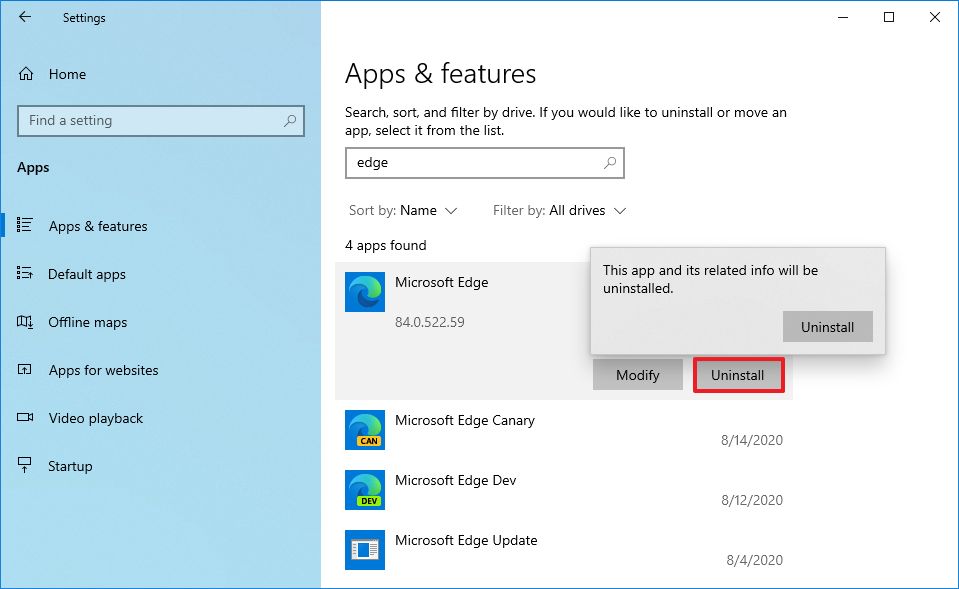
Once you complete the steps, the version of the browser you selected will be removed from your computer.
How to uninstall Microsoft Edge (Chromium) using Command Prompt
If the option to uninstall Microsoft Edge isn’t available in Settings, because you received the new browser through Windows Update, you’ll need to use Command Prompt to remove it.
To get rid of the Chromium version of Microsoft Edge, use these steps:
- Open Start.
- Search for Command Prompt, right-click the top result, and select the Run as administrator option.
- Type the following path to access the Installer folder and press Enter:
cd %PROGRAMFILES(X86)%\Microsoft\Edge\Application\8*\InstallerQuick note: On Windows 10, the “Installer” folder resides inside another folder named after the version number of the browser currently installed on your device; as a result, the name may change as new updates roll out. So, in the path, we’re using the number “8” with a wildcard “*” to access the folder no matter the 8x.x.xxx.xx version you have installed. However, once the browser reaches version 9x.x.xxx.x, you’ll need to update the path to 9 with the wildcard. - Type the following command to remove Microsoft Edge and press Enter:
setup --uninstall --force-uninstall --system-level
Link : https://www.windowscentral.com/how-remove-microsoft-edge-windows-10#uninstall_edge_chromium_cmd_windows10
Update 25 Apr 2022 :
cd %PROGRAMFILES(X86)%\Microsoft\Edge\Application\9*\Installer
cd %PROGRAMFILES(X86)%\Microsoft\Edge\Application\10*\Installer